Sony Interactive entertainment has announced that PlayStation 4 system software update version 4.50 will launch worldwide tomorrow
You can read the overview of the features being added below.
External HDD
As we previously mentioned, 4.50 allows to download and store PS4 games and apps to an external HDD. Insert your USB 3.0 HDD into your console, and select it from ‘USB Storage Devices’ from ‘Devices’ in Settings to format it so it’s ready to use (note, any previously stored content will be wiped from the HDD).
Note: compatible HDDs need to be USB 3.0 or later, between 250GB (min) – 8TB (max).
The HDD will now be the default download location as long as it’s plugged in; you can select the PS4’s internal storage instead on the ‘Storage’ section in Settings. You can easily move your internally-stored games and apps across to the HDD by selecting ‘Applications’ in ‘Storage’, press the ‘Options’ button and select ‘Move to Extended Storage’. You’ll be able to choose which games and apps you want to move.
To safely remove the HDD, hold down the PS button on your controller and select ‘Sound/Devices’ and then ‘Stop Using Extended Storage’ from the Quick Menu.
There is no guarantee that all USB storage devices are compatible with your system.
Improved 2D Images on PS VR
If you’re playing a game in PS VR and you return to the PS4 home screen, you may notice that the resolution looks lower than normal on the TV Social Screen. Following this update, you’ll find that the resolution of the system screen displayed on your TV is significantly better when you’re out of VR mode.
Also, the resolution of Cinematic Mode on PS VR will improve — if your PS VR screen size is set to Small or Medium, the frame rate of content viewed in Cinematic Mode goes up from 90Hz to 120Hz with this update.
Voice Chat for Remote Play
We’re adding voice chat when using Remote Play on Windows PC, Mac or an Xperia device. This is especially useful if you’ve got a gaming session planned with your friends, but you’re away from your system. You can switch your mic on and off via the microphone icon on the Tool Bar of the Remote Play app.
Off Console Availability
We have a variety of off-console apps and features that make communication with other gamers easier, like the PlayStation App and PS Messages. We’re adding an icon, shaped like a smartphone, which indicates a player is logged into PSN but away from their system.
Boost Mode (for PlayStation 4 Pro only)
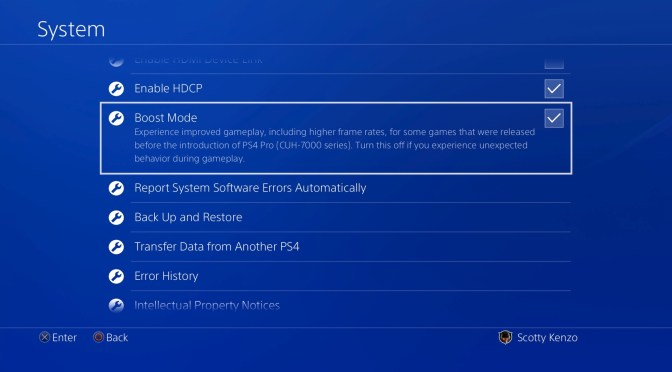
PS4 Pro gets a new feature in this update called Boost Mode. This feature has been designed to provide better performance for select legacy titles that have not been patched to take advantage of the PS4 Pro’s faster CPU and its faster and double-sized GPU.
This can provide a noticeable frame rate boost to some games with variable frame rates, and can provide frame rate stability for games that are programmed to run at 30 Hz or 60 Hz. Depending on the game, the increased CPU speed may also result in shorter load times. You can turn on Boost Mode by going to Settings > System.
Keep in mind that Boost Mode is not guaranteed to work with all titles. Turning the setting off will allow the game to be played in a mode that replicates the standard PS4.
PS Messages and Communities app Updates
We’re also updating the PS Messages (Android/iOS) and PS Communities (Android/iOS) apps tomorrow with a few handy features.
- When you receive a Party invitation from your friends on PS Messages, now you can respond with a quick reply, “I’ll join later” or “Sorry, I can’t join,” when you want to get back to them ASAP.
- On the Communities app, you can now easily check the PSN service status under Settings > View Status of PSN Services.
- Also on the Communities app, iOS users can tell at a glance if there are any new posts in their community by checking the badge app icon (the number in a red circle at the top-right corner of the app’s icon).








 New Challenger Gaming