Cyberdimension Neptunia: 4 Goddesses Online

Our beloved Nep Nep is back (did she ever leave?) with yet another game for us.  Where are we adventuring this time? Inside an MMO, of course!  This winter on the PlayStation 4 and Steam you’ll help Nep Nep hack and slash her way inside an MMO to save the bring back the creators of the game and defeat the Demon King!

In this hack ‘n’ slash adventure co-developed with Tamsoft and Compile Heart, everyone’s favorite four Goddesses enter an online fantasy game world inspired by…themselves! Joined by the CPU Candidates, you’ll fight in 4-person real-time brawls, unleash devastating Awakening Skills, customize with tons of cosmetic accessories, and even play online with others!
Key Features
  • 4 Person Dungeon Raids You’ll never go it alone in the dungeons when you’ve got 3 other party members helping exterminate dungeon fodder in this hack ‘n’ slash adventure! Choose the one you control whenever you want!

  • You CAN Cast that Here Be prepped for any situation when you can map multiple skills to each face button, and max out your meter to unleash a flashy “Awakening Skill” that will devastate those who cross you!

  • +10 to Fashion – Show off tons of cosmetic gear that can be resized, rotated, and placed anywhere! Ever seen a mustachioed fairy pirate DJ? Now you can!

  • Nep_Main Joined your Party Play online with up to three other people for extra loot and harder enemies, plus use the in-game chat feature to really make it feel like an MMO! (It’s not.)

DLC Character “Whip” has been announced for KOF XIV

SNK has announced that The King of Fighters XIV is getting their first DLC character, “Whip”will returning to the franchise.

Whip is the first of the upcoming DLC character to be added to the title.

No release date has been mentioned as of yet, but you can check out “Whip” in her reveal trailer below:


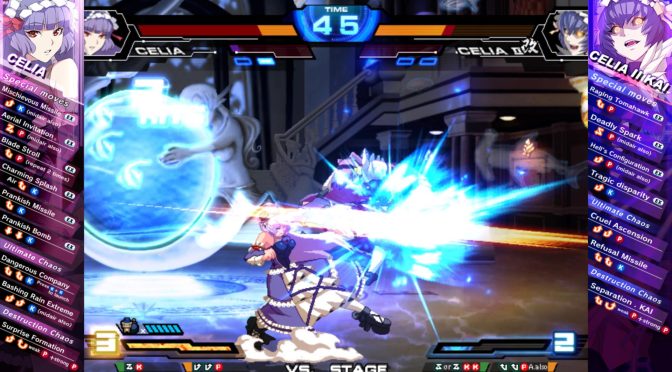
Chaos Code: New Sign of Catastrophe is coming to Steam and PS4 March 15

Arc System Works Co, Ltd. has announced Chaos Code: New Sign of Catastrophe will be heading to Steam (PC) and Playstation 4 this month. This is the latest installment of the hi-speed 2D fighting game developed by FK Digital.

The game will be available on the PlayStation Network for the PlayStation 4 and Steam (PC) on March 15.

You can read on some Key features of the game, check out screenshots, and watch the latest trailer below:

Key Features:

  • I Can’t Lie, They’ve Got Moves Like…
    Lupinus and Ray, newcomers to the series, join the rest of the chaos cast! Not only that, but each of the 16 unique characters have an additional four moves not present in the original that players can choose from to suit their play style.
  • Modes, Modes, Modes
    A variety of game modes such as Arcade Mode, Versus Mode, Mission Mode and more!
  • Such Color, Much Wow 
    Let your unique style shine through! Use the “Color Edit” Mode to customize the color scheme of your favorite character for that personal touch!
  • I Wanna Be the Very Best
    Play online with everyone from your friends to the best fighters from around the world, and battle them to compete for the highest rank!

PS4 Update 4.50 will be out Tomorrow, External HDD support, Pro Boost, plus more

Sony Interactive entertainment has announced that PlayStation 4 system software update version 4.50 will launch worldwide tomorrow

You can read the overview of the features being added below.


External HDD

As we previously mentioned, 4.50 allows to download and store PS4 games and apps to an external HDD. Insert your USB 3.0 HDD into your console, and select it from ‘USB Storage Devices’ from ‘Devices’ in Settings to format it so it’s ready to use (note, any previously stored content will be wiped from the HDD).

Note: compatible HDDs need to be USB 3.0 or later, between 250GB (min) – 8TB (max).

The HDD will now be the default download location as long as it’s plugged in; you can select the PS4’s internal storage instead on the ‘Storage’ section in Settings. You can easily move your internally-stored games and apps across to the HDD by selecting ‘Applications’ in ‘Storage’, press the ‘Options’ button and select ‘Move to Extended Storage’. You’ll be able to choose which games and apps you want to move.

To safely remove the HDD, hold down the PS button on your controller and select ‘Sound/Devices’ and then ‘Stop Using Extended Storage’ from the Quick Menu.

There is no guarantee that all USB storage devices are compatible with your system.

Improved 2D Images on PS VR

If you’re playing a game in PS VR and you return to the PS4 home screen, you may notice that the resolution looks lower than normal on the TV Social Screen. Following this update, you’ll find that the resolution of the system screen displayed on your TV is significantly better when you’re out of VR mode.

Also, the resolution of Cinematic Mode on PS VR will improve — if your PS VR screen size is set to Small or Medium, the frame rate of content viewed in Cinematic Mode goes up from 90Hz to 120Hz with this update.

Voice Chat for Remote Play
We’re adding voice chat when using Remote Play on Windows PC, Mac or an Xperia device. This is especially useful if you’ve got a gaming session planned with your friends, but you’re away from your system. You can switch your mic on and off via the microphone icon on the Tool Bar of the Remote Play app.

Off Console Availability
We have a variety of off-console apps and features that make communication with other gamers easier, like the PlayStation App and PS Messages. We’re adding an icon, shaped like a smartphone, which indicates a player is logged into PSN but away from their system.

Boost Mode (for PlayStation 4 Pro only)
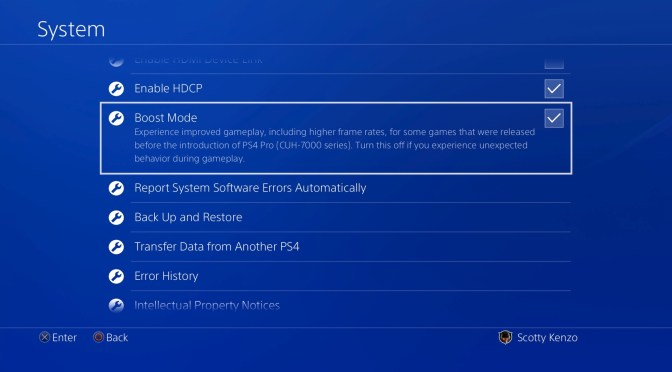
PS4 Pro gets a new feature in this update called Boost Mode. This feature has been designed to provide better performance for select legacy titles that have not been patched to take advantage of the PS4 Pro’s faster CPU and its faster and double-sized GPU.

This can provide a noticeable frame rate boost to some games with variable frame rates, and can provide frame rate stability for games that are programmed to run at 30 Hz or 60 Hz. Depending on the game, the increased CPU speed may also result in shorter load times. You can turn on Boost Mode by going to Settings > System.

Keep in mind that Boost Mode is not guaranteed to work with all titles. Turning the setting off will allow the game to be played in a mode that replicates the standard PS4.

PS Messages and Communities app Updates
We’re also updating the PS Messages (Android/iOS) and PS Communities (Android/iOS) apps tomorrow with a few handy features.

  • When you receive a Party invitation from your friends on PS Messages, now you can respond with a quick reply, “I’ll join later” or “Sorry, I can’t join,” when you want to get back to them ASAP.
  • On the Communities app, you can now easily check the PSN service status under Settings > View Status of PSN Services.
  • Also on the Communities app, iOS users can tell at a glance if there are any new posts in their community by checking the badge app icon (the number in a red circle at the top-right corner of the app’s icon).


Dreamhack is Launching a line of PC’s

Today Dreamhack has announced that they will be releasing their very own PC line.

Dreamhack is widely known for their (Bring Your Own Computer) LAN party and DreamHack has over 20 years experience arranging festivals, events and competitions throughout the Nordics, Europe and North America.

DreamHack PC will launch featuring four product lines, each specifically targeted for a gamer’s needs.

Here is an overview and release video on what to expect.


The DreamHack PC is built using components from the leading brands in the business and with the extensive knowledge from DreamHack’s LAN parties, event usage and esport competitions. We truly believe that we have a line of gaming computers that will meet the demands for all kinds of gamers ranging from the beginner, the esport professionals, to content creators, and broadcasters that demand a flawless experience from their PC.

DREAMHACK PC – PLAY
DreamHack PC PLAY delivers great performance for the most popular games and comes with components from some of the very best manufacturers on the market. PLAY is the most affordable DreamHack PC with great price performance, all with DreamHack DNA included.

DREAMHACK PC – GAMING
DreamHack PC GAMING delivers awesome performance in all new and popular games ranging from the most popular competitive esport games to the latest block buster titles from the biggest publishers. DreamHack PC Gaming is built only with the very best components in its class and is fully upgradable and flexible.

DREAMHACK PC – ESPORTS
DreamHack PC ESPORTS is made to deliver flawless esports performance in a real life competitive environments on LAN and on the biggest stages in the esports world. DreamHack is one of the biggest esport tournament organisers in the world and knows what it takes of a machine to be the best tool for a professional team and players that are competing on the highest level. DreamHack PC ESPORTS can be the deciding factor between a win or a loss.

DREAMHACK PC – STREAMER
DreamHack PC STREAMER delivers performance for the high end user to stream and play on in full resolution. Amazing machine for content creators, youtubers and broadcasters who share their gaming experience in real time with their audiences. With two top of the line graphic cards and some of the very best components available the DreamHack PC STREAMER is the choice for professionals and the most demanding gamers!